
 Simon Let
209abcee9e
Simon Let
209abcee9e
|
7 years ago | |
|---|---|---|
| .github/workflows | 7 years ago | |
| cmd | 7 years ago | |
| conf | 7 years ago | |
| data/sanitizer | 7 years ago | |
| img | 7 years ago | |
| pkg | 7 years ago | |
| scripts | 7 years ago | |
| submodules | 7 years ago | |
| .gitignore | 7 years ago | |
| .gitmodules | 7 years ago | |
| .goreleaser.yml | 7 years ago | |
| Gopkg.lock | 8 years ago | |
| Gopkg.toml | 8 years ago | |
| LICENSE | 7 years ago | |
| Makefile | 7 years ago | |
| README.md | 7 years ago | |
| VERSION | 7 years ago | |
| go.mod | 7 years ago | |
| go.sum | 7 years ago | |
README.md
Rich Enhanced Shell History
What
This project is the first phase of my Master project.
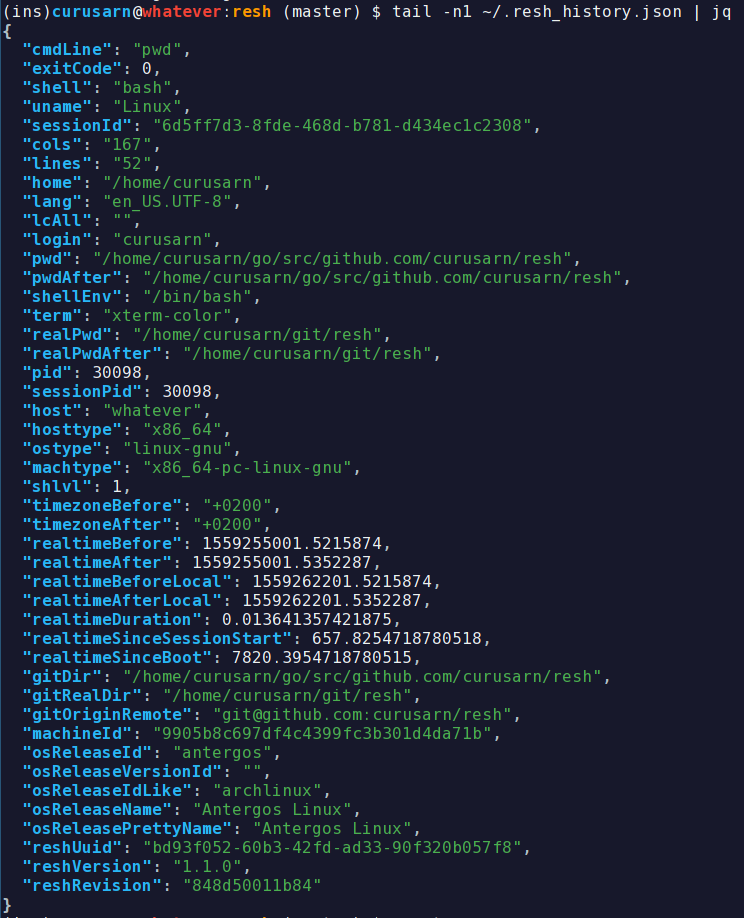
It records shell history with rich set of metadata and saves it locally. (device, directory, git, time, terminal session pid, ... see example below)
It doesn't change the way your shell and your shell history behaves.
You won't notice any delay in your shell (~40ms).
If you are not happy with it you can uninstall it with a single command (rm -rf ~/.resh).
Why
The ultimate point of my thesis is to provide a context-based replacement/enhancement for bash and zsh shell history.
The idea is to:
- Save each command with metadata (device, directory, git, time, terminal session pid, ... see example below)
- Recommend history based on saved metadata
- e.g. it will be easier to get to commands specific to the project you are currently working on (based on directory, git repository url, ...)
- Provide a simple way to search whole history by command itself and/or metadata (e.g. imagine searching by project, directory, device, ...)
- Synchronize history across devices
- Provide an API (to make the project easily extensible)
- And more ...
In order to be able to develop a good history tool I will need to get some insight into real life shell usage patterns.
That's why I ask YOU to install this tool to locally record your shell history.
After some time (probably a few months) I will create a script to replace anything too personal in the recorded data by placeholders.
Then I will ask you to run the script against the recorded data and tell me if you are willing to share the resluts with me.
I'm very thankful for anyone who is willing to support my thesis by providing their usage data!
If you install RESH, please give me some contact info using this form: https://forms.gle/227SoyJ5c2iteKt98
Prereqisities
gitgolang>1.6 (preferably >1.11)
Installation
Simplest
Just run bash -c "$(wget -O - https://raw.githubusercontent.com/curusarn/resh/master/scripts/rawinstall.sh)" from anywhere.
Simple
- Run
git clone https://github.com/curusarn/resh.git && cd resh - Run
make autoinstallfor assisted build & instalation.- OR Run
make installif you know how to build Golang projects.
- OR Run
If you install RESH, please give me some contact info using this form: https://forms.gle/227SoyJ5c2iteKt98
Compatibility
Works in bash and zsh.
Tested on:
- Arch
- Manjaro
- MacOS
- Ubuntu (18.04)
- really old Ubuntu (16.04)
Examples
Resh history is saved to ~/.resh_history.json
Each line is a JSON that represents one executed command line.
This is how I view it tail -f ~/.resh_history.json | jq or jq < ~/.resh_history.json.
You can install jq using your favourite package manager or you can use other JSON parser to view the history.
Known issues
Q: I use bash on macOS and resh doesn't work
A: You have to add [ -f ~/.bashrc ] && . ~/.bashrc to your ~/.bash_profile.
Long Answer: Under macOS bash shell only loads ~/.bash_profile because every shell runs as login shell. I will definitely work around this in the future but since this doesn't affect many people I decided to not solve this issue at the moment.
Issues
You are welcome to create issues: https://github.com/curusarn/resh/issues
Uninstallation
You can uninstall this project at any time by running rm -rf ~/.resh/
You won't lose any recorded history by removing ~/.resh directory because history is saved in ~/.resh_history.json.