
7.6 KiB

Rich Enhanced Shell History
Context-based replacement/enhancement for zsh and bash shell history - ⚠️ Work in progress
Motivation
When you execute a command in zsh or bash following gets recorded to your shell history:
- Command itself
- Date
- Duration of the command (only in zsh and only if enabled)
But shell usage is contextual - you probably use different commands based on additional context:
- Current directory
- Current git repository/origin
- Previously executed commands
- etc ...
Additionally it's annoying to not have your shell history follow you accros your devices. Have you lost your history when reinstalling? I personally think this is unacceptable in 2020.
Why not synchronize your shell history accross your devices and add some metadata to know where it came from:
- Hostname
- OS
- etc ...
Imagine being able to search your shell history based on both the command itself and all this additional metadata.
What this project does
| Legend | |
|---|---|
| ✔️ | Implemented |
| ✅ | Implemented but I'm not happy with it |
| ❌ | Not implemented |
NOTE: Features can change in the future
-
✔️ Record shell history with metadata
- ✔️ save it as JSON to
~/.resh_history.json
- ✔️ save it as JSON to
-
✅ Provide an app to search the history
- ✔️ provide binding for Control+R (enable it using
reshctl enable ctrl_r_binding_global) - ✔️ use current context when searching (host, directory, git, exit status)
- ✔️ allow searching completely without context ("raw" mode)
- ❌ import and search history from before RESH was installed
- ❌ allow listing details for individual commands
- ❌ include a help page with keybindings and onboarding in the app
- ❌ allow explicitly searching by metadata
- ✔️ provide binding for Control+R (enable it using
-
✅ Provide bindings for arrow keys
- ✔️ imitate default behaviour
- ✔️ save additional metadata (e.g. command was recalled using arrow keys)
- ❌ use the context (metadata) when searching
- ✔️ zsh
- ✅ bash (performance issues)
-
✔️ Provide a
reshctlutility to control and interact with the project- ✔️ zsh completion
- ✔️ bash completion
-
❌ Multi-device history
- ❌ Synchronize recorded history between devices
- ❌ Allow proxying history when ssh'ing to remote servers
-
❌ Provide a stable API to make resh extensible
-
✔️ Support zsh and bash
-
✔️ Support Linux and macOS
-
✅ Require only essential prerequisite software
- ✔️ Linux
- ✅ MacOS (requires coreutils -
brew install coreutils)
-
✔️ Provide a tool to sanitize the recorded history
Prereqisities
Standard stuff: bash, curl, tar, ...
Bash completions will only work if you have bash-completion installed
MacOS: coreutils (brew install coreutils), bash4.3+ is recommended
Installation
Simplest
Run this command.
curl -fsSL https://raw.githubusercontent.com/curusarn/resh/master/scripts/rawinstall.sh | bash
Simple
- Run
git clone https://github.com/curusarn/resh.git && cd resh - Run
scripts/rawinstall.sh
Examples
Update
Check for updates and update
reshctl update
RESH CLI tool
RESH CLI searches your history by commands. It uses host, directories, git remote, and exit status to show you relevant results first.
All this context is not in the regular shell history. RESH CLI will only search shell history that was recorded after you install this project.
I use RESH CLI everyday but please remember that it is still a prototype.
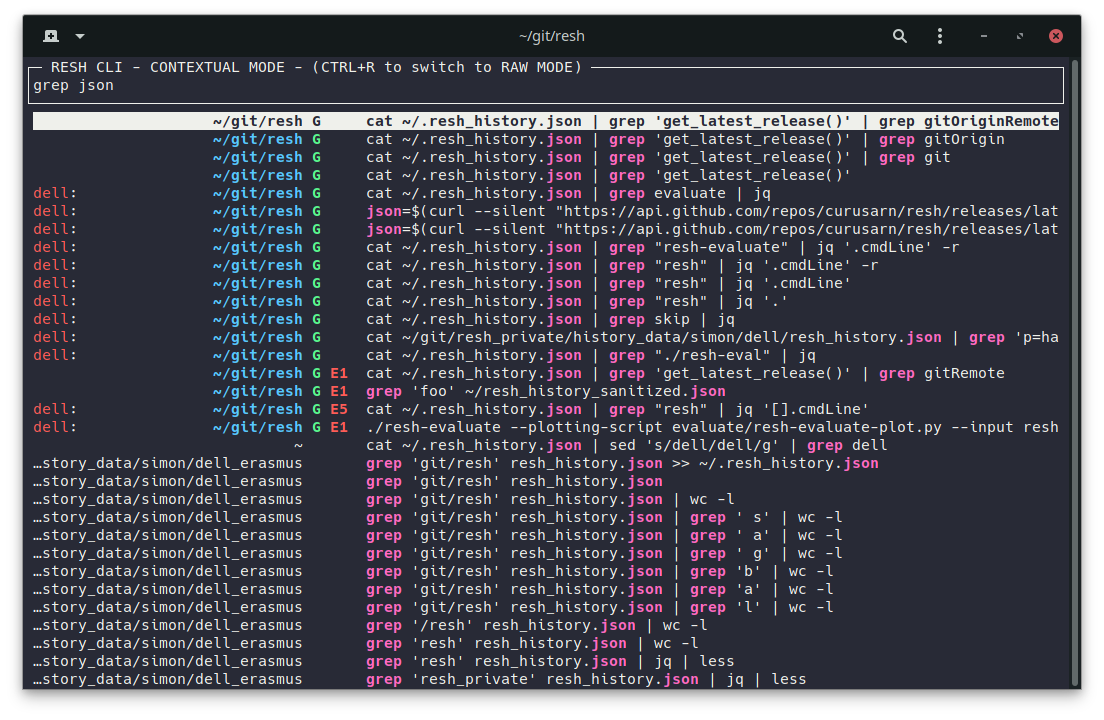
Without query, RESH CLI shows you the latest history based on the current context (host, directory, git).
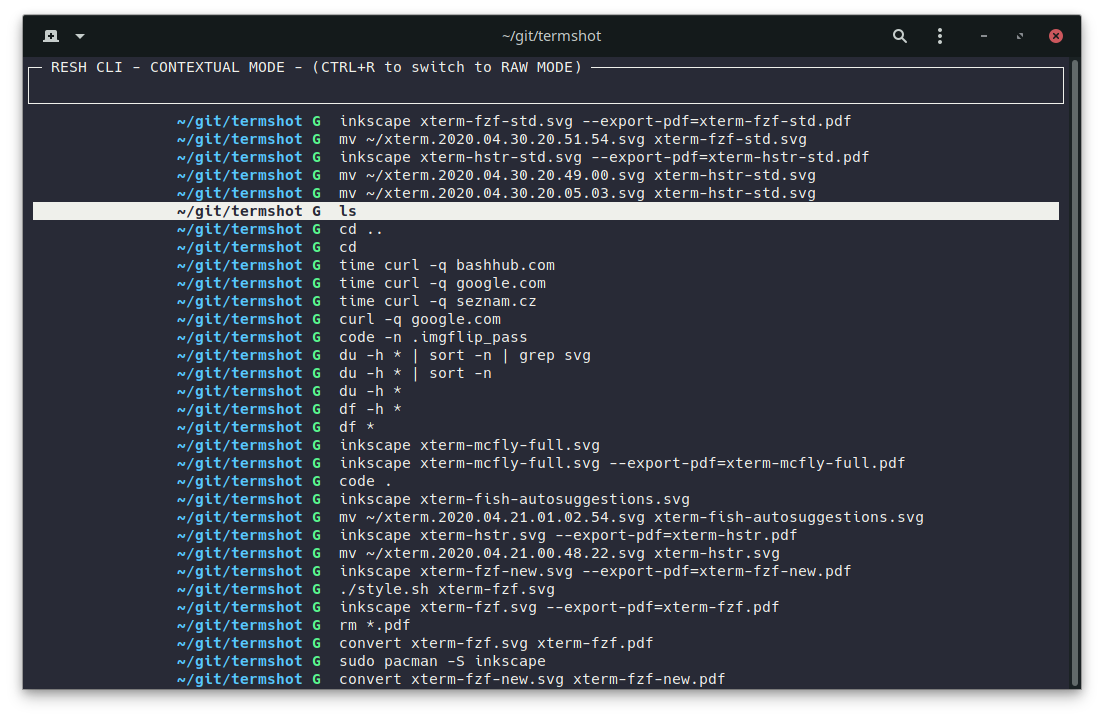
RESH CLI tool can be bound to ctrl+R (recommended) or executed directly.
Enable/disable ctrl+R binding for THIS shell session:
reshctl enable ctrl_r_binding
reshctl disable ctrl_r_binding
Enable/disable for FUTURE shell sessions:
reshctl enable ctrl_r_binding_global
reshctl disable ctrl_r_binding_global
Run the RESH CLI tool as a one-off:
resh
Arrow key bindings
Resh provides arrow key bindings.
These bindings do regular stepping through history and prefix search.
They allow resh to record bindings usage metadata.

In example above I pressed UP, pressed DOWN, pressed UP (prefix search make) and the command line after the last command line retrieved from history was make build so we see that I executed the retrieved command without editing it.
Arrow key bindings are enabled by default in zsh and they are disabled by default in bash because there are some performance issues.
Enable/disable arrow key bindings for THIS shell session:
reshctl enable arrow_key_bindings

reshctl disable arrow_key_bindings
Enable/disable for FUTURE shell sessions:
reshctl enable arrow_key_bindings_global

reshctl disable arrow_key_bindings_global
See what your current setting is:
reshctl status
View the recorded history
Resh history is saved to ~/.resh_history.json
Each line is a JSON that represents one executed command line.
This is how I view it tail -f ~/.resh_history.json | jq or jq < ~/.resh_history.json.
You can install jq using your favourite package manager or you can use other JSON parser to view the history.
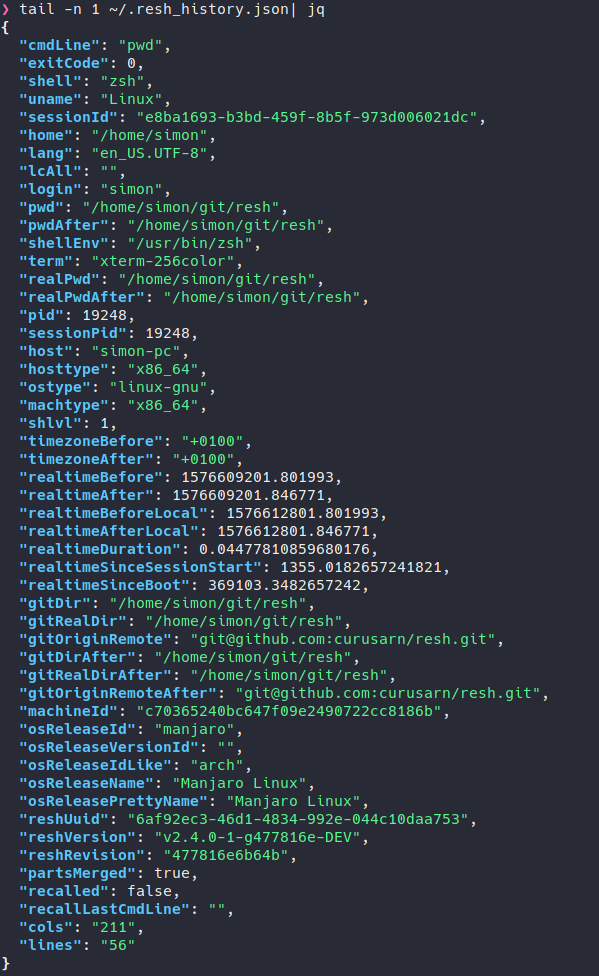
Recorded metadata will be reduced to only include useful information in the future.
Data sanitization and analysis
In order to be able to develop a good history tool I will need to get some insight into real life shell and shell history usage patterns.
This project is also my Master thesis so I need to be a bit scientific and base my design decisions on evidence/data.
Running reshctl sanitize creates a sanitized version of recorded history.
In sanitized history, all sensitive information is replaced with its SHA256 hashes.
If you tried sanitizing your history and you think the result is not sanitized enough then please create an issue or message me.
If you would consider supporting my research/thesis by sending me a sanitized version of your history then please give me some contact info using this form: https://forms.gle/227SoyJ5c2iteKt98
Known issues
Q: I use bash on macOS and resh doesn't work
A: You have to add [ -f ~/.bashrc ] && . ~/.bashrc to your ~/.bash_profile.
Long Answer: Under macOS bash shell only loads ~/.bash_profile because every shell runs as login shell. I will definitely work around this in the future but since this doesn't affect many people I decided to not solve this issue at the moment.
Issues and ideas
Please do create issues if you encounter any problems or if you have a suggestions: https://github.com/curusarn/resh/issues
Uninstallation
You can uninstall this project at any time by running rm -rf ~/.resh/
You won't lose any recorded history by removing ~/.resh directory because history is saved in ~/.resh_history.json.