
1.9 KiB
Rich Enhanced Shell History
What
This project is the first phase of my master thesis.
It records shell history with rich set of metadata and saves it locally.
It doesn't change the way your shell and your shell history behaves.
Even this first version is fairly fast (~40ms).
If you are not happy with it you can uninstall it with a single command (rm -rf ~/.resh).
Why
The ultimate point of my thesis is to provide a drop-in replacement for bash and zsh shell history.
The idea is to provide following:
- Context-based history
- Simple way to search whole history by command itself and/or metadata
- Synchronization across devices
- And more ...
Prereqisities
gitgolang(>1.11 if possible but we can deal with old ones as well)
Installation
Simplest
Just run bash -c "$(wget -O - https://raw.githubusercontent.com/curusarn/resh/master/rawinstall.sh)" from anywhere.
Simple
- Run
git clone https://github.com/curusarn/resh.git && cd resh - Run
make autoinstallfor assisted build & instalation.- OR Run
make installif you know how to build Golang projects.
- OR Run
Compatibility
Works in bash and zsh.
Tested on:
- Arch
- MacOS
- Ubuntu (18.04)
- really old Ubuntu (16.04)
Examples
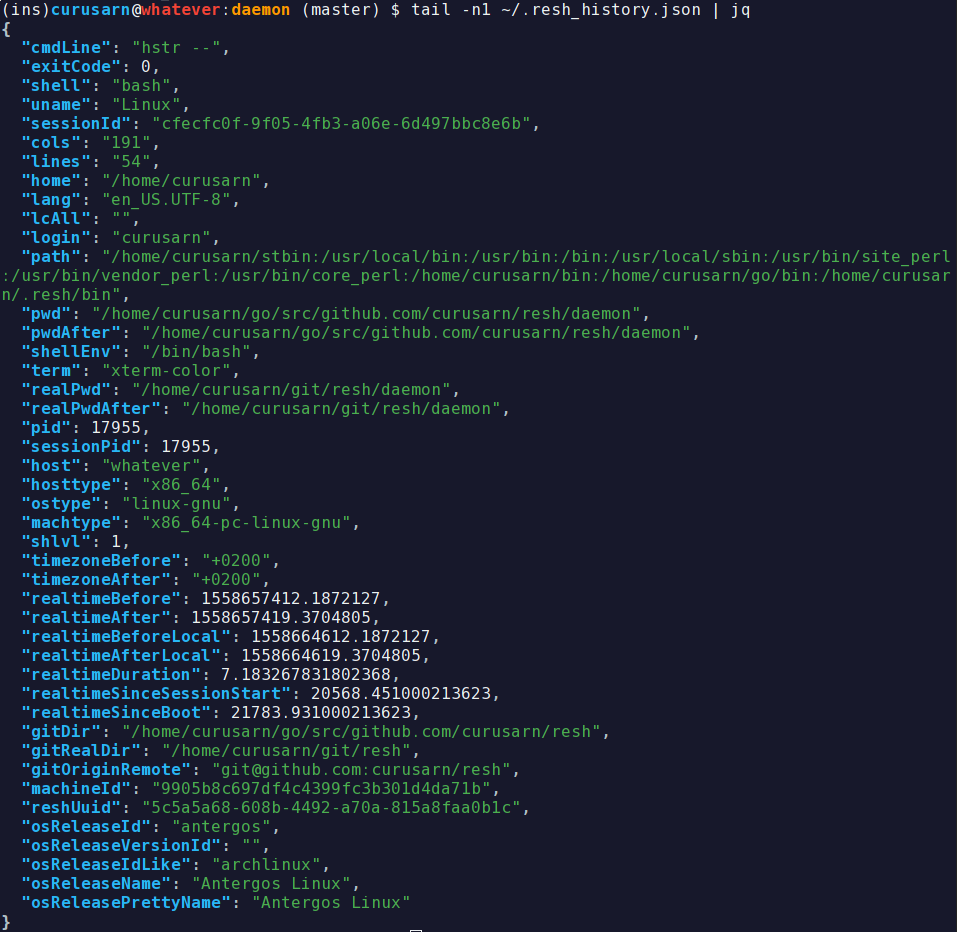
Resh history is saved to ~/.resh_history.json
Each line is a JSON that represents one executed command line.
This is how I view it tail -f ~/.resh_history.json | jq or jq < ~/.resh_history.json.
You can install jq using your favourite package manager or you can use other JSON parser to view the history.
Issues
You are welcome to create issues: https://github.com/curusarn/resh/issues
Uninstallation
You can uninstall this project at any time by running rm -rf ~/.resh/
You won't lose any recorded history by removing ~/.resh directory because history is saved in ~/.resh_history.json.